

“Is Framer worth it” is not really a question about Framer. It is a question about you. It means: is this the tool that finally gets my site live without swallowing my weekend, and is the monthly bill worth what I get back? So let me answer it the way I would answer a friend who is about to hand over a credit card, not the way a marketing page would.
I have built real sites in Framer. Not template demos that live for a weekend, but pages that had to load fast on a phone, get edited by someone who is not a designer, and stay up. That experience is the whole point of this review. I am going to tell you what Framer genuinely nails, where it quietly costs you, exactly what each plan gets you at 2026 prices, and the specific type of person who should skip it entirely. By the end you will not be guessing. You will know whether your money and your hours are safe here.
Short version, so you are not held hostage: for most people building a marketing site, portfolio, or landing page, yes, Framer is worth it. But there are real exceptions, and I will name them.
The 30-second verdict
If you read nothing else, read this.
Framer is worth it if you want a beautiful, fast, hosted website live in hours instead of weeks, you value design quality and smooth motion, and you do not want to learn to think like a front-end developer to get there. The free plan lets you build and feel the whole thing before you pay a cent, and paid plans start low enough that the value is obvious the moment you connect a custom domain.
Framer is probably not worth it if you are running a large store with inventory, variants, and checkout as the core of your business, or you are building a massive, deeply relational content database with thousands of interlinked records, or your entire site is a single line of text where any free one-pager would do the job. In those cases you are paying for strengths you will not use, or asking Framer to be something it is not.
Everything below is just the detailed version of those two paragraphs, with the receipts.
Curious whether it clicks for you specifically? Do not take my word for it. Start a free Framer site and try to publish one real page in the next hour. No credit card needed, and one hour of building tells you more than any review, including this one.
What Framer actually is (so we judge it fairly)
Before deciding if something is worth it, you have to be clear on what it is trying to be. Judging Framer as a store backend or a database engine is like judging a sports car for how much plywood it can haul. Wrong test.
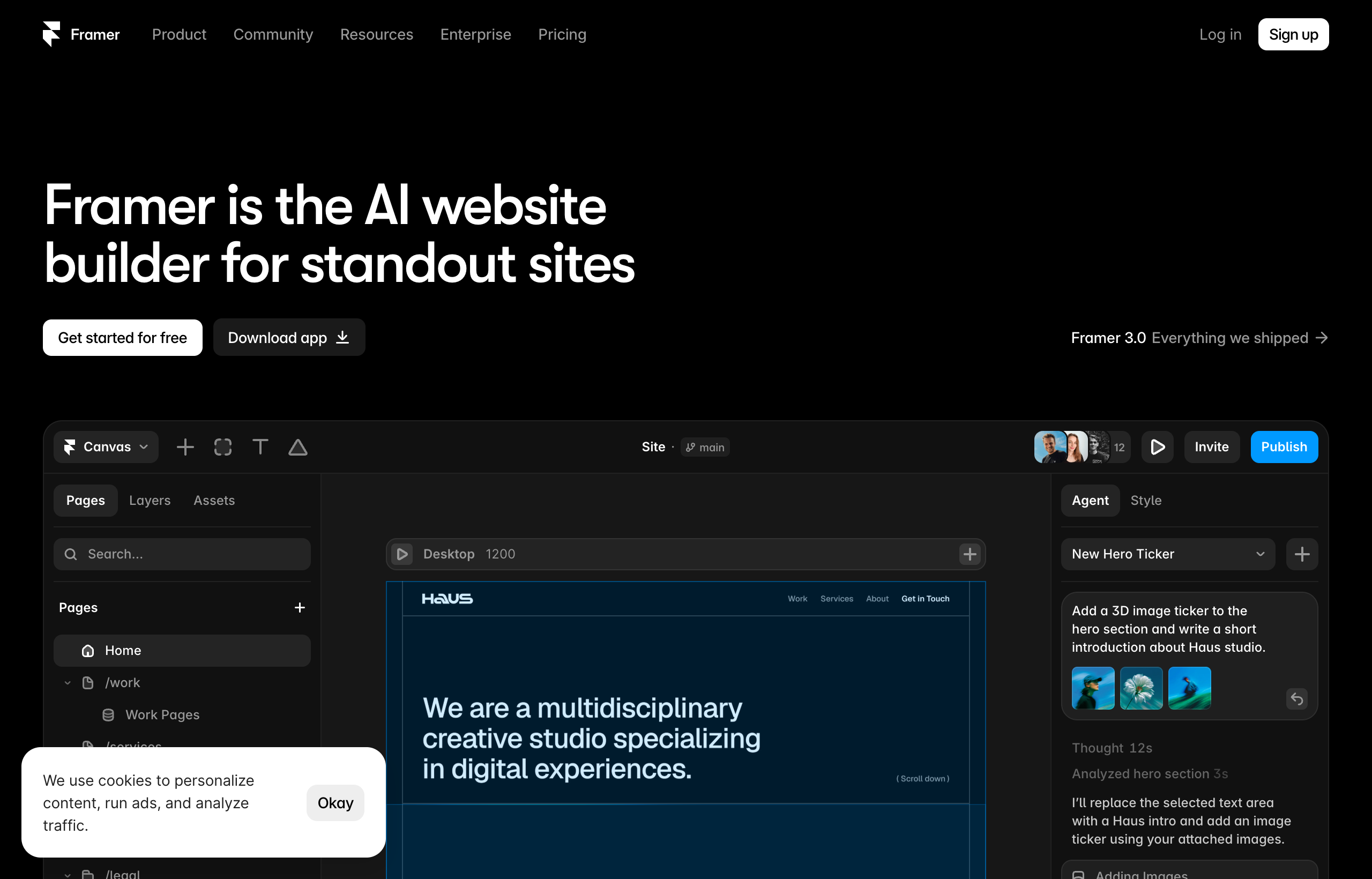
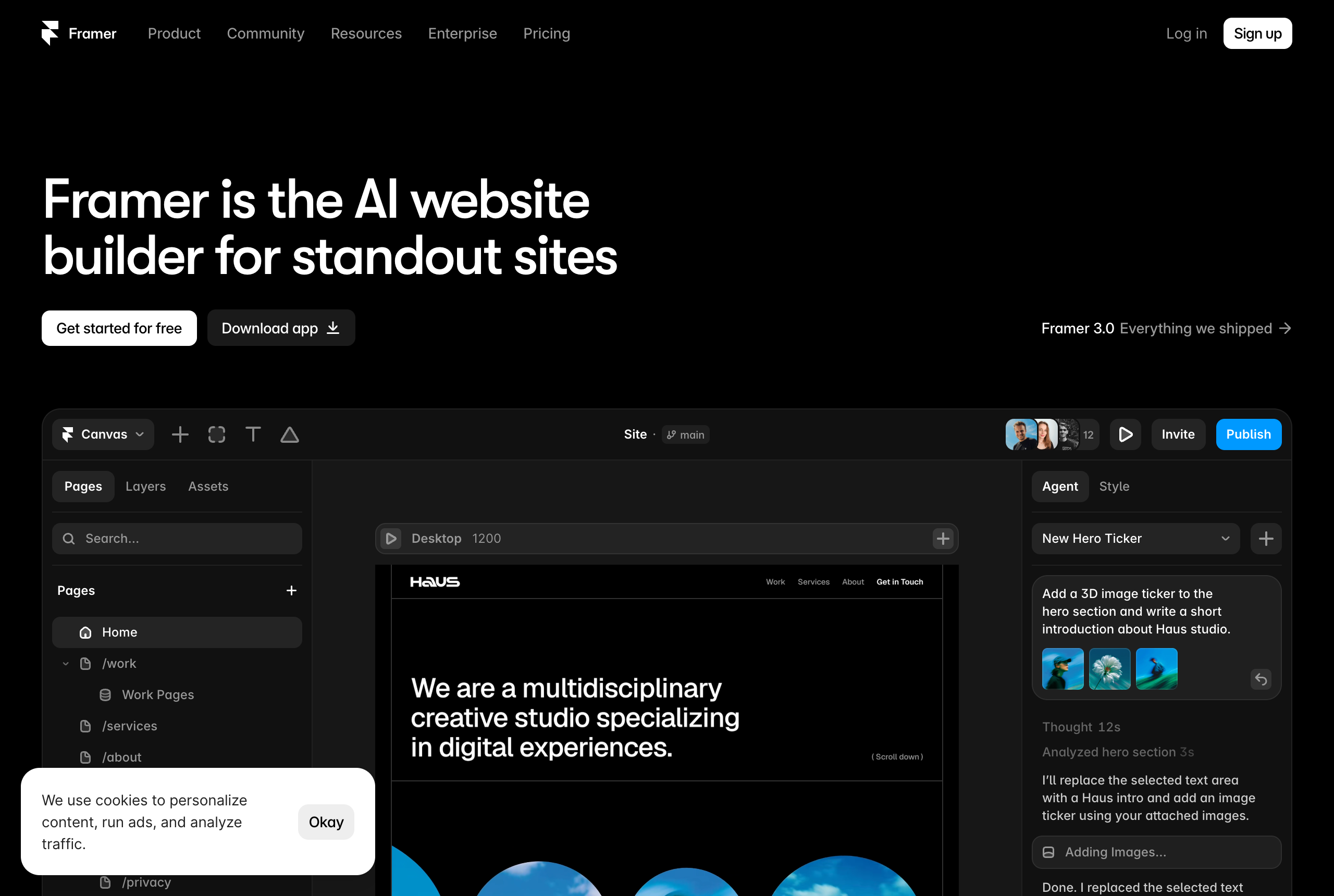
Framer is a no-code, design-first website builder. It grew out of a design and prototyping tool, so the canvas feels like Figma: you drag elements, type directly onto the page, and drop in pre-built sections. It is fully hosted on a global CDN, which means there is no server to rent, no deploys to babysit, and no security patches on your plate. You design, you hit publish, and it is live on a real domain.
It also ships with the things you would otherwise bolt on later: a CMS for blogs and dynamic pages, a template marketplace, AI features that can generate and edit, responsive breakpoints for desktop, tablet, and phone, and SEO controls for meta title, description, Open Graph image, and alt text. You can even paste Figma frames straight onto the canvas and the layers stay editable, so text stays text.
So the fair question is not “can Framer do everything.” It is “for the kind of site most people actually build, is it worth the price and the learning time.” That is the test I am running.
Where Framer is genuinely worth it
Let me be specific about the value, because “it is good” is useless when your money is on the line.
Speed from blank canvas to live URL
This is the single strongest argument for Framer being worth it. The distance between “I have an idea” and “here is the live link” is short. You pick a template or a blank canvas, edit text and images inline, drag in a few sections, connect a domain, and publish. A confident beginner can put a clean one-page site online in an afternoon. Someone experienced can do a landing page in an hour.
That speed is not a vanity metric. It is the difference between a site that ships and a project that dies in a folder called “website, final, v3.” If you have ever paid for a builder and then never actually launched, you already know that the tool that gets you to publish is the one that was worth the money.
Design quality by default
Framer looks polished before you touch anything, because the defaults were built by people who care about typography and spacing. You are not fighting the tool to make things look decent. This matters more than it sounds. Most cheap or overly simple builders make it easy to build something that looks like everyone else. Framer makes it easy to build something that looks intentional, and for a portfolio, a startup landing page, or a small business, looking intentional is a big part of what you are paying for.
Motion that reads as premium
Scroll effects, appear-on-scroll animations, hover states, and smooth page transitions are built in and mostly a matter of selecting an element and choosing an effect. This is why so many modern startup and portfolio sites you admire feel expensive. In most builders, that kind of motion is either impossible or a painful custom job. In Framer it is close to free. If a premium feel matters for your brand, this alone can justify the plan.
Hosting you never think about
Because Framer is fully hosted, you are not renting a server, configuring anything, or worrying about a plugin update taking your site down at 2 a.m. For a solo founder or freelancer, removing that entire category of problem is worth real money. The time you do not spend on maintenance is time you spend on the actual business.
It grows with you, up to a point
Need a blog, a case-study library, a changelog, or a jobs page? The CMS handles collections and generates dynamic pages from them cleanly. You are not forced to abandon the tool the moment you want a second content type. There are limits, which I will get to honestly, but for the content most marketing sites need, it is enough.
Where Framer costs you (the honest trade-offs)
A review that only lists strengths is an ad. Here is where Framer takes something from you, so you can decide if the trade is fair.
There is a learning curve, just a gentle one
Framer is much easier than developer-grade tools, but “no-code” does not mean “no learning.” If you have never used a design tool like Figma or Canva, the first hour can feel unfamiliar. The canvas, layers, and responsive stacks all have a logic you have to absorb. It is a short climb, not a cliff, but budget an afternoon to feel fluent rather than expecting instant mastery.
The free plan is a trial, not a destination
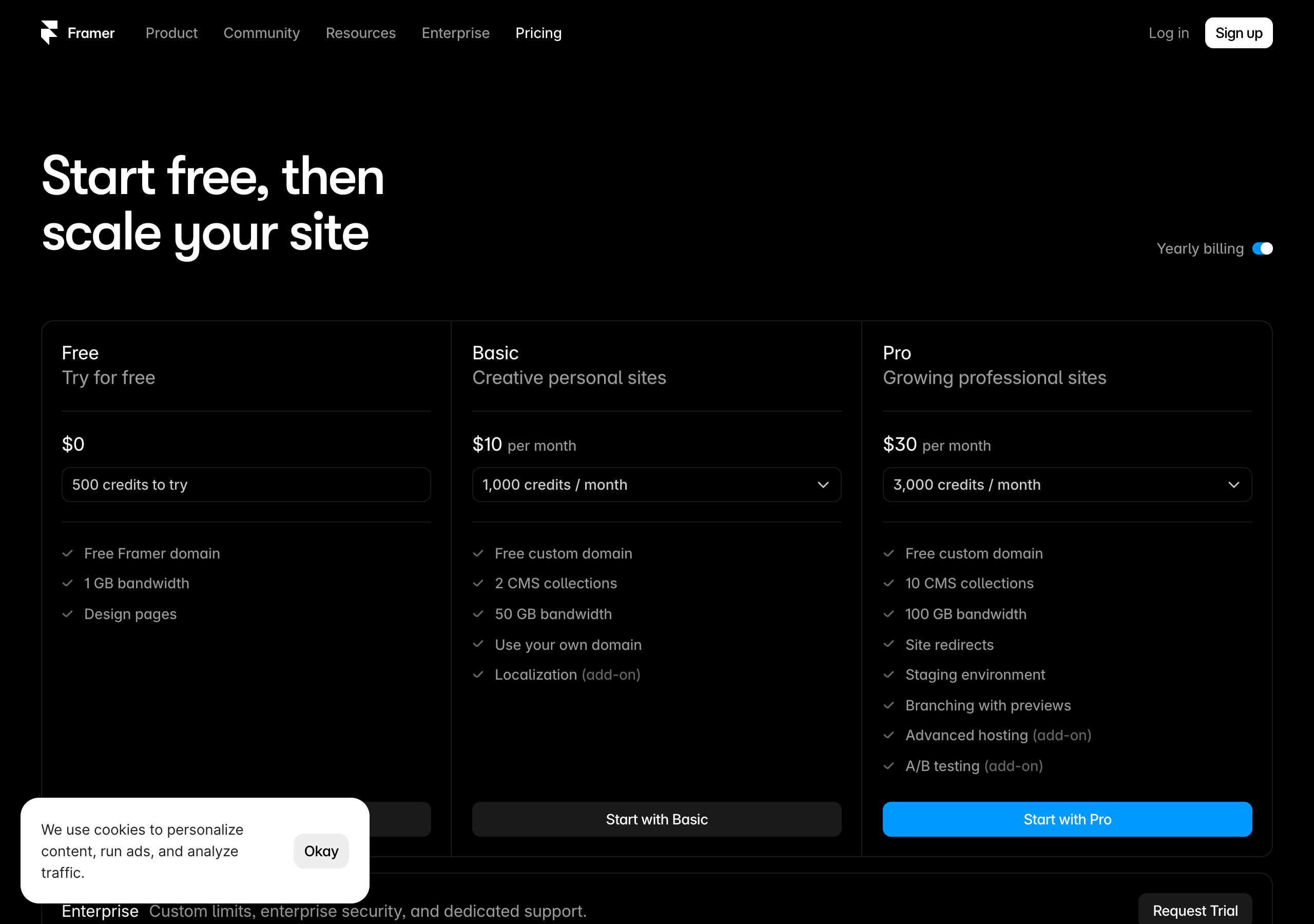
The free plan is genuinely useful for building and testing, but it is not where you live long term. It uses a framer.website subdomain, shows a Framer badge, and includes 1 GB of bandwidth. To put your site on your own domain and drop the badge, you are paying. That is fair, but do not mistake “free to build” for “free forever on your own domain.” The value question really begins at the Basic plan.
CMS collections are capped by plan
If you are planning a serious content operation with many interrelated content types, the collection limits matter. Straight from Framer’s live pricing page, the Basic plan includes 2 CMS collections and the Pro plan includes 10. For a marketing blog, that is plenty. For a complex, relational content architecture with many linked types, you need to count your collections before you commit, and possibly conclude a different tool fits better.
It is not a store, and it is not a database engine
This is the big one. Framer is not a full e-commerce backend with inventory, variants, and a checkout engine, and it is not built to be a heavy relational database with thousands of records linking to each other in complex ways. If your business is fundamentally a store or a large structured data product, asking Framer to carry that is the wrong test. It can present those things beautifully as a front end, but it is not the engine underneath. Be honest about which one you are building.
Deep structural control has a ceiling
For rich layouts, expressive typography, and most of what a marketing site needs, you will almost never feel boxed in. But if you have a developer’s mental model and a demanding, unusual design that needs pixel-level class engineering and intricate conditional layouts, you will eventually feel Framer’s ceiling. Most people never reach it. The ones who do usually know in advance, because they are building something unusually complex.
Still on the fence about whether the value fits your project? The fastest way to settle it is to build, not to read. Spin up a free Framer project and publish one real page today. If it feels this fast and this good on the first try, you already have your answer.
Framer pricing in 2026: what you actually pay
You cannot answer “is it worth it” without the real numbers, so here they are. This is straight from Framer’s live pricing page, on yearly billing, captured July 2026.
| Plan | Price | What you actually get |
|---|---|---|
| Free | $0 | 500 credits to try, free framer.website domain, 1 GB bandwidth, design pages, Framer badge |
| Basic | $10/mo | Free custom domain, 2 CMS collections, 50 GB bandwidth, use your own domain |
| Pro | $30/mo | 10 CMS collections, 100 GB bandwidth, site redirects, staging environment, branching with previews, A/B testing (add-on) |
| Enterprise | Custom | Custom limits, enterprise security, dedicated support |
One thing I appreciate about Framer’s model: it prices per site, so the math is simple. One site, one predictable bill, no separate “workspace” charge stacked on top that surprises you at checkout. That clarity is part of the value.
Now the worth-it read on each tier.
Free is worth it for everyone, because it costs nothing and lets you build the whole thing before deciding. Use it as an extended test drive.
Basic at $10/mo is the real entry point and, for most people, the moment Framer becomes clearly worth it. You get your own custom domain and the badge goes away, which is the difference between a hobby link and something you put on a business card. For a portfolio, a personal site, or a simple business page, this is a small monthly number for a professional, hosted, maintenance-free site.
Pro at $30/mo is worth it when you have a reason for it, and those reasons are concrete: more CMS collections, more bandwidth, a staging environment, branching with previews, and A/B testing as an add-on. If more than one person edits the site, or you run a real content operation, or you want to test variations, Pro earns its price. If you are a solo creator with a five-page site, you probably do not need it yet.
Enterprise is a “call them” situation and only relevant if you already know you need it.
The honest summary: Framer is not the cheapest builder on the market, and it is not trying to be. It is priced like a design-quality, fully hosted tool, and for the sites it is good at, that price buys back your time and makes you look professional. That is usually a trade worth making.
Who Framer is worth it for
Averages are useless when you have one specific situation. So here is the direct call by type of person.
- Freelancers and solo founders: yes. You need to look professional and ship fast without a training project. Framer is built for exactly this. The per-site pricing and zero maintenance fit how you actually work.
- Designers moving to the web: strongly yes. If you already think in Figma, Framer will feel like home, and you will produce better-looking sites faster than in almost anything else.
- Small businesses: yes. A restaurant, studio, clinic, or local service gets a fast, professional site live in a day, and the owner can edit text later without a course.
- Startups and SaaS: yes. Fast iteration, a premium feel, easy A/B testing on Pro, and simple pricing match how startups move.
- Bloggers and content marketers: yes, within reason. For a normal marketing blog, the CMS is more than enough. For a massive, deeply relational editorial database, look harder before you commit.
Who should skip Framer
Trust comes from telling you when not to buy. Here is who I would steer away, at least for now.
- Serious e-commerce sellers. If inventory, variants, and checkout are the heart of your business, a dedicated store platform is the right engine. Framer is not built to be that backend, and forcing it will cost you more than it saves.
- Teams building a large, complex relational content site. Directories, marketplaces, and databases with thousands of interlinked records will run into the collection limits and the structural ceiling. A tool built for heavy relational CMS work fits better.
- Anyone who needs pure, cheap, one-page simplicity and nothing else. If your entire site is a name, a sentence, and a link, you may not need Framer’s power or its price. An ultra-simple one-pager tool can do that for less.
- Developers who want to hand-engineer every class and structure. If your happiness depends on granular control over the box model and utility classes, you will feel the ceiling and be happier in a more developer-oriented builder.
If you are in one of these groups, Framer being “good” does not make it worth it for you specifically. Buy the tool that fits the job.
How Framer compares to the alternatives (quick and honest)
You are not choosing in a vacuum, so here is where Framer sits against the usual names, kept fair and general.
- Webflow is more powerful and structural, with a full class system and a strong relational CMS, but it has a steeper learning curve and split pricing that can add up. Worth it over Framer when you are building a large, complex, content-heavy site and have the time or the developer to unlock it.
- Wix and Squarespace are beginner-friendly all-in-one builders with polished templates, but they offer less design finesse and weaker animation than Framer. If design quality and motion matter to you, Framer usually pulls ahead.
- WordPress is massively flexible with a huge plugin ecosystem, but it needs hosting, maintenance, and security work. Framer trades that flexibility for a hosted, no-maintenance experience, which many people find is worth it.
- Figma is a design tool, not a website builder or host. You design there and bring it to a builder like Framer to actually publish, and Framer’s Figma-paste workflow makes that handoff smooth.
- Shopify is a dedicated e-commerce platform. If you are running a real store, that is the honest pick for the store engine, even if you love Framer for the marketing pages.
The pattern: Framer wins on design quality per hour, speed, motion, and pricing clarity. It concedes to specialists when your project is fundamentally a store, a database, or a deeply engineered structural build.
Common mistakes people make deciding on Framer
- Judging it on the free plan alone. The free plan is a trial with a subdomain and a badge. The real value shows up at Basic, when you connect your own domain. Do not conclude “not worth it” from the trial limits.
- Buying Pro before you need it. If you have a small solo site, Basic is likely enough. Do not pay for staging, branching, and extra collections you will not touch yet.
- Asking Framer to be a store or a database. This is the biggest one. If your business is e-commerce or heavy relational data, that is a specialist job. Framer can be the beautiful front end, not the engine.
- Never actually building anything before deciding. An hour in the free version settles more than a week of comparison articles. The people who agonize longest are usually the ones who have not touched the canvas.
- Ignoring the CMS collection limits. If you are planning many content types, count your collections against the plan before you commit, not after.
Frequently asked questions
Is Framer worth paying for, or is the free plan enough? The free plan is enough to build and test, but not to launch professionally, because it uses a framer.website subdomain and shows a badge. To use your own domain and drop the badge, the Basic plan at $10/mo (yearly billing) is the real starting point, and for most people it is clearly worth it.
Is Framer good for beginners? Yes, with a small caveat. It is one of the easier serious builders to learn, especially if you have used any design tool. Expect to spend an afternoon getting comfortable rather than mastering it in five minutes.
Is Framer worth it for a portfolio? Strongly yes. It is one of the fastest ways to a beautiful, live portfolio, the motion effects make your work look premium, and a portfolio never hits the CMS limits.
Is Framer worth it for e-commerce? Usually no, if the store is the core of your business. Framer is not a full store backend with inventory, variants, and checkout. It can present products beautifully as a front end, but a dedicated e-commerce platform is the right engine for a real store.
How much does Framer cost per month? On yearly billing in 2026: Free is $0, Basic is $10/mo, Pro is $30/mo, and Enterprise is custom. Framer prices per site, so there is no separate workspace charge stacked on top.
Is Framer better than Wix or Squarespace? For design quality and animation, most people find Framer produces a more premium result. Wix and Squarespace are friendly all-in-one tools, but Framer gives you more creative finesse and smoother motion, which is often what you are really paying for.
Do I need to know how to code to use Framer? No. It is a no-code visual builder. You design on a canvas and publish, with no code required, though you can add custom code if you want to.
Can I try Framer before I pay? Yes. The free plan lets you build a real site, use templates, and publish to a framer.website subdomain with no credit card, so you can feel the whole experience before deciding.
The bottom line
Strip away the feature lists and it comes down to one sentence. If your goal is a beautiful, fast, hosted website that you can launch this week and maintain without stress, Framer is worth it, and for most people reading this, comfortably so. The free plan lets you prove that to yourself before you pay, and the Basic plan turns it into a real, professional, custom-domain site for a small monthly number.
Where it is not worth it is equally clear, and I would rather you hear it from me than learn it after paying: if you are building a serious store, a heavy relational database, or the simplest possible one-liner, buy the tool that fits that job instead. Matching the tool to the project is the whole game.
The best part is that this is one of the few “is it worth it” questions you can answer for free, in under an hour, with your own two hands.
Create your free Framer site now, drop in a template, make it yours, and publish it to a live URL. If it feels this fast and this good on the first try, you already know your answer, and you did not spend a dime to find it.
Pricing, plan names, and CMS limits cited from Framer’s live pricing page, captured July 2026. Tiers and numbers change over time, so confirm the current details on framer.com/pricing before you buy.


