
You are not here to learn what a website builder is. You are here because you are about to commit. On one side is WordPress, the platform that runs a huge share of the internet and can be bent into almost anything. On the other is Framer, a hosted no-code builder that gets a beautiful site live in an afternoon and never asks you to touch a server again. Whichever you pick, you are choosing how you will spend the next year of Saturdays. So the only question worth answering is the honest one: for the site you are actually trying to build, which one should you build on?
I have shipped real sites on both. I have babysat a WordPress install through a plugin conflict that took a site down on a Friday night, and I have watched a client edit their own Framer page without breaking anything, six months after handoff. That difference in lived experience is the whole reason this comparison exists. Most “Framer vs WordPress” articles online are written by someone who has strong feelings about one and secondhand opinions about the other.
This one scores both tools on eight specific criteria that actually change your day to day, tells you upfront what each criterion means, gives a per-criterion verdict, lands it all in a scorecard, and finishes with a per-use-case recommendation instead of a limp “it depends.” Let us settle it.
The 60-second answer
If you read nothing else, read this.
- Choose Framer if your goal is a fast, gorgeous marketing site, portfolio, or landing page that you can publish this week and then basically forget about. No hosting to buy, no plugins to update, no security to patch. It looks premium by default, and a non-technical person can maintain it. For most people typing “Framer vs WordPress” into Google, this is the right call.
- Choose WordPress if you are building something big, plugin-dependent, or highly custom: a content empire with thousands of posts, a membership site, a complex store, a forum, or anything that needs a specific plugin or full ownership of your own hosting and database. WordPress is nearly infinitely extensible, and that ceiling is real. So is the maintenance bill that comes with it.
Both can produce a professional, fast, well-ranked website. The core difference is philosophical. Framer is an all-in-one hosted product that trades some flexibility for zero maintenance and design speed. WordPress is an open platform that trades convenience for near-infinite extensibility and total ownership. Almost everything below is a consequence of that one split.
Want to feel the difference before you read another 3,000 words? Start a free Framer site and try to publish something in the next hour. The free plan needs no credit card, and the fastest way to end a “which platform” debate is to touch one and see how far you get.
How I scored them, and the 8 criteria
A comparison is only trustworthy if you know what is being measured. Here are the eight things I scored, and one line on why each one decides real projects:
- Setup and hosting. How much you have to buy, configure, and stand up before you even have a blank page to design. This is where WordPress asks the most of you up front.
- Maintenance and security. The ongoing tax: updates, backups, plugin conflicts, and the patching that keeps a site from getting hacked. This is the cost nobody tells beginners about.
- Design and speed to launch. How fast a non-developer goes from nothing to a polished, live page, and how good it looks without hiring a designer.
- Flexibility and plugins. How far you can extend the platform when you need a feature it does not ship with. This is WordPress’s home turf.
- CMS and content scale. How well each handles a growing library of posts, pages, and structured content, from ten items to tens of thousands.
- Learning curve. How long before you are actually productive, not just poking around and Googling error messages.
- SEO and performance. Whether the platform can produce fast, well-marked-up pages that rank, and how much work that takes.
- Total cost. Not the sticker price, but the real annual number once hosting, a theme, premium plugins, and your own time are on the table.
I scored each criterion independently, then translated the results into per-use-case recommendations at the end. Let us go one round at a time.
Round 1: Setup and hosting
This is the first place the two philosophies diverge, and it is a wide gap.
With Framer, there is no setup in the traditional sense. You sign up, you get a canvas, and you start designing. It is fully hosted on a global CDN. When you hit publish, your site is live, worldwide, instantly. You never rent a server, never install anything, never touch a database, never think about the word “hosting” again. A custom domain connects in a few clicks from the Basic plan up, and until then you get a free framer.website subdomain to work on.
WordPress, in the sense most people mean it (self-hosted WordPress.org, not the hosted WordPress.com service), is the opposite. Before you design a single thing, you need to choose a hosting provider, buy a plan, point a domain at it, install WordPress, pick and install a theme, and usually install a page builder plugin on top of that before the editing experience feels modern. None of these steps is impossibly hard, and managed WordPress hosts have smoothed a lot of it. But it is genuinely several decisions and a few hours before you are building, and every one of those decisions is one you now own forever.
Here is the practical contrast. With Framer, “getting started” means opening a browser tab. With self-hosted WordPress, “getting started” means becoming, in a small way, your own system administrator. Some people want that control. Many people are surprised to learn it was part of the deal.
Verdict: Framer wins on setup and hosting, decisively. There is simply nothing to stand up. WordPress gives you ownership of your stack, but you pay for it in time before you have even started designing.
Round 2: Maintenance and security
This is the round that separates the two most sharply over the life of a site, and it is the one beginners underestimate the most.
A Framer site has essentially no maintenance. There are no plugins to update, no core software to patch, no PHP version to worry about, no database to back up, no security holes introduced by a third-party add-on you installed and forgot about. Framer maintains the platform. Your job is the content and the design. That is the entire deal, and it is a big part of why hosted builders exist.
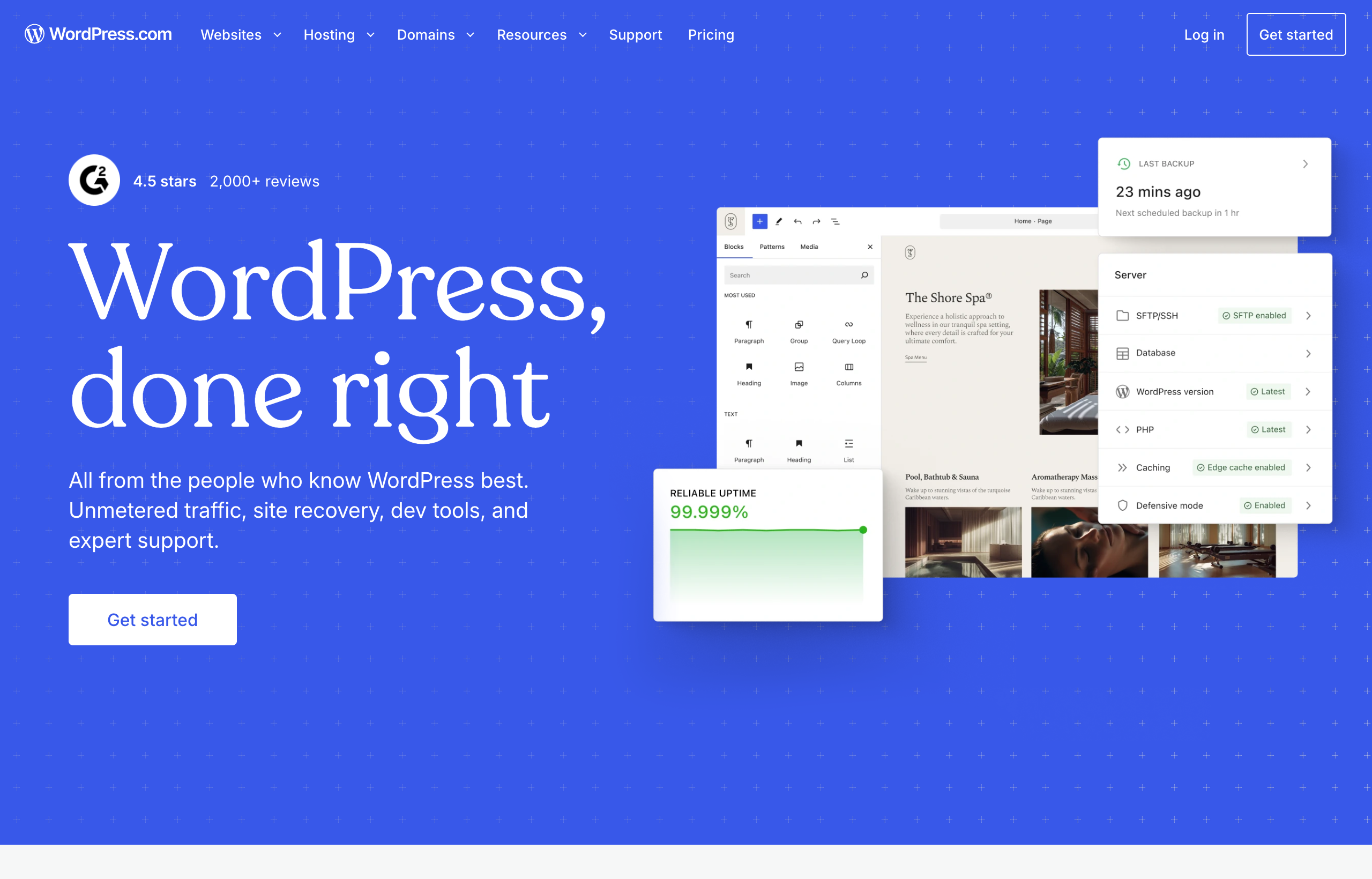
WordPress’s flexibility comes from its plugin ecosystem, and that same ecosystem is its ongoing burden. A typical real-world WordPress site runs a theme plus a handful to a few dozen plugins, each from a different developer, each updating on its own schedule. Updates can conflict. A plugin can go unmaintained and become a security risk. WordPress powers so much of the web that it is a constant target, and the overwhelming majority of WordPress hacks trace back to out-of-date plugins, themes, or core, not to the platform being insecure at its heart. So a responsible WordPress owner keeps regular backups, applies updates promptly, and often runs a security plugin and a caching layer on top. Managed hosts automate a chunk of this, which is exactly why they charge more.
I want to be fair here: none of this is unmanageable, and millions of people handle it fine. But it is real, recurring work, and it never ends as long as the site is live. The honest way to say it is that with WordPress you are not just the designer, you are also the person on call when something breaks.
Verdict: Framer wins on maintenance and security, decisively. Zero maintenance is not a marketing line here, it is the actual experience. WordPress asks for ongoing vigilance, and the sites that skip it are the ones that get hacked.
Round 3: Design and speed to launch
This is Framer’s other home turf, and it is not close either.
Framer grew out of a design and prototyping tool, and it shows the moment you open the canvas. It feels like Figma. You drag elements, type directly onto the page, drop in a pre-built section, and it looks polished by default because the defaults were made by people who care about typography and spacing. Motion is built in: scroll effects, appear-on-scroll animations, hover states, and smooth page transitions are mostly a matter of selecting an element and choosing an effect. A confident beginner can genuinely publish a clean, modern one-page site in a single afternoon, and it will look like it cost real money.
WordPress design quality depends entirely on the theme and page builder you choose, and the range is enormous. With a strong premium theme and a mature page builder, you can build something excellent. But “beautiful by default” is not the WordPress experience. Free themes often look generic, customization can fight you, and getting a site to look genuinely premium usually means either paying for a good theme, wrestling a page builder, or hiring a designer. The gap between “installed WordPress” and “looks professional” is wide, and closing it is work.
Here is a concrete scenario. You need a launch landing page: a hero, three feature blocks, testimonials, an FAQ, and a signup call to action, live by the weekend and looking sharp. In Framer, that is an afternoon for a beginner and an hour for anyone experienced, and it will look designed. In WordPress, it is very achievable, but for a beginner it means choosing a theme, likely installing a page builder, learning that builder, and accepting that the result may still need a designer’s eye to feel premium.
Verdict: Framer wins on design and speed to launch, clearly. It is the shorter path from a blank canvas to a live URL that looks expensive. WordPress can match the result, but only with the right theme, more time, and more skill.
Round 4: Flexibility and plugins
Now the pendulum swings hard the other way. This is where WordPress earns its reputation and its market share.
WordPress is nearly infinitely extensible. There is a plugin for almost anything: memberships, forums, learning management systems, complex forms, event calendars, multilingual sites, marketing automation, and full e-commerce through WooCommerce. Because it is open source and self-hosted, you own the code and the database, you can hire any of a huge pool of developers to build custom functionality, and you are never waiting on a single company to add the feature you need. If your project has an unusual requirement, the odds that WordPress can do it are very high. That is a genuine, durable advantage, and it is why WordPress remains the default for anything complex or long-lived.
Framer, as an all-in-one hosted product, is more bounded by design. You get what the platform ships plus a growing library of components, plugins, and integrations, and it covers the needs of most marketing sites, portfolios, and landing pages well. But it is not an open platform you can extend without limit. If you need a very specific piece of functionality that Framer does not offer and no integration covers, you can hit a wall that, on WordPress, you would have solved with a plugin. The trade is deliberate: Framer gives up some of that unlimited extensibility in exchange for the zero-maintenance, beautiful-by-default experience it is built around.
Verdict: WordPress wins on flexibility and plugins, decisively. If your project needs a specific plugin, a membership system, a forum, or bespoke custom functionality, WordPress’s open ecosystem is unmatched. Framer covers the common cases cleanly but is not infinitely extensible.
If you have been stuck comparing spec sheets for a week, that is the trap. The people who win just start building and let the live site teach them what they actually need. Spin up a free Framer project and publish one real page today. You will learn more in an hour of building than in a day of reading comparisons like this one.
Round 5: CMS and content scale
This is closer than the plugin round, but the two win at different sizes.
WordPress began life as blogging software, and content management is in its bones. It handles posts, pages, categories, tags, custom post types, and custom fields, and with the right setup it scales to tens of thousands of pieces of content and complex editorial workflows with multiple authors, roles, and permissions. For a large blog, a news publication, or a true content empire, WordPress’s CMS is proven at a scale most tools never reach. This is the core reason so many big content sites run on it.
Framer has a capable CMS too, and it has improved fast. Collections generate dynamic pages, so a blog, a case-study library, a changelog, or a jobs board works cleanly and looks great. The place to plan ahead is the CMS collection limits by plan. Straight from Framer’s live pricing page: the Basic plan includes 2 CMS collections and the Pro plan includes 10. For a marketing blog or a modest content section, that is plenty. If you are architecting a large operation with many interrelated content types and thousands of interlinked entries, count your collections before you commit, and be honest about where the site will be in two years.
The clean way to think about it: Framer’s CMS is more than enough for the content most marketing sites and portfolios actually publish. WordPress’s CMS is the one you want when content volume and editorial complexity are the whole point of the project.
Verdict: WordPress wins for large-scale, high-volume, multi-author content. Framer is more than enough for the blogs and content sections most marketing sites need.
Round 6: Learning curve
Framer is the gentler on-ramp by a wide margin. If you have ever used Figma, Canva, Sketch, or any modern design tool, you will feel oriented within an hour. The mental model is “design on a canvas,” which most people already have, and because there is no hosting, no plugins, and no updates, there is simply less to learn. The whole surface area is smaller.
WordPress is not one skill, it is several. You learn the WordPress dashboard, then your theme’s quirks, then your page builder, then whichever plugins your site depends on, and eventually a little about hosting, backups, and troubleshooting when something conflicts. Plenty of people learn all of it and become very productive, and the sheer size of the WordPress community means an answer to almost any problem exists somewhere. But budget the time honestly. WordPress is a platform you grow into, not an app you intuit in an afternoon.
This difference compounds at handoff. Giving a Framer site to a marketing teammate for content edits is low-friction. Giving someone a WordPress site and asking them to update it without installing the wrong plugin or breaking the theme is a bigger ask, and it is why so many small businesses end up paying someone to maintain a site they were told they could run themselves.
Verdict: Framer wins on learning curve, clearly, especially for solo founders, freelancers, and small teams who want to ship without a training project first.
Round 7: SEO and performance
Let us kill a myth first: neither platform has a secret SEO advantage that will decide your rankings. Both can produce fast, semantic, mobile-friendly pages that rank well, and rankings are won by content, links, and matching search intent far more than by your choice between these two.
Framer gives you the SEO levers that matter out of the box: meta title, meta description, Open Graph image, alt text, heading structure, and clean URLs, plus responsive breakpoints for desktop, tablet, and phone. Because it is fully hosted on a CDN and optimizes image delivery well by default, a Framer site tends to be fast without you doing anything special, which quietly saves beginners from the most common speed mistake.
WordPress can absolutely be fast and well-optimized, but performance is something you assemble rather than something you get. A typical fast WordPress site relies on a good host, a caching plugin, an image-optimization plugin, a lean theme, and an SEO plugin like the popular ones for managing metadata and sitemaps. Do all of that well and WordPress ranks with anyone. Skip it, pile on plugins and a heavy theme, and you get the slow, bloated WordPress site everyone has complained about at some point. The control is real; so is the responsibility.
The honest summary: for a well-built site, SEO and performance are a wash between the two. The difference is that Framer makes “fast” the default and WordPress makes it a project.
Verdict: A tie on ceiling. Framer wins on how little effort it takes to get there. Do not choose based on SEO alone; choose based on how much performance tuning you want to own.
Round 8: Total cost
Here is where sticker prices lie, so let us use real structure.
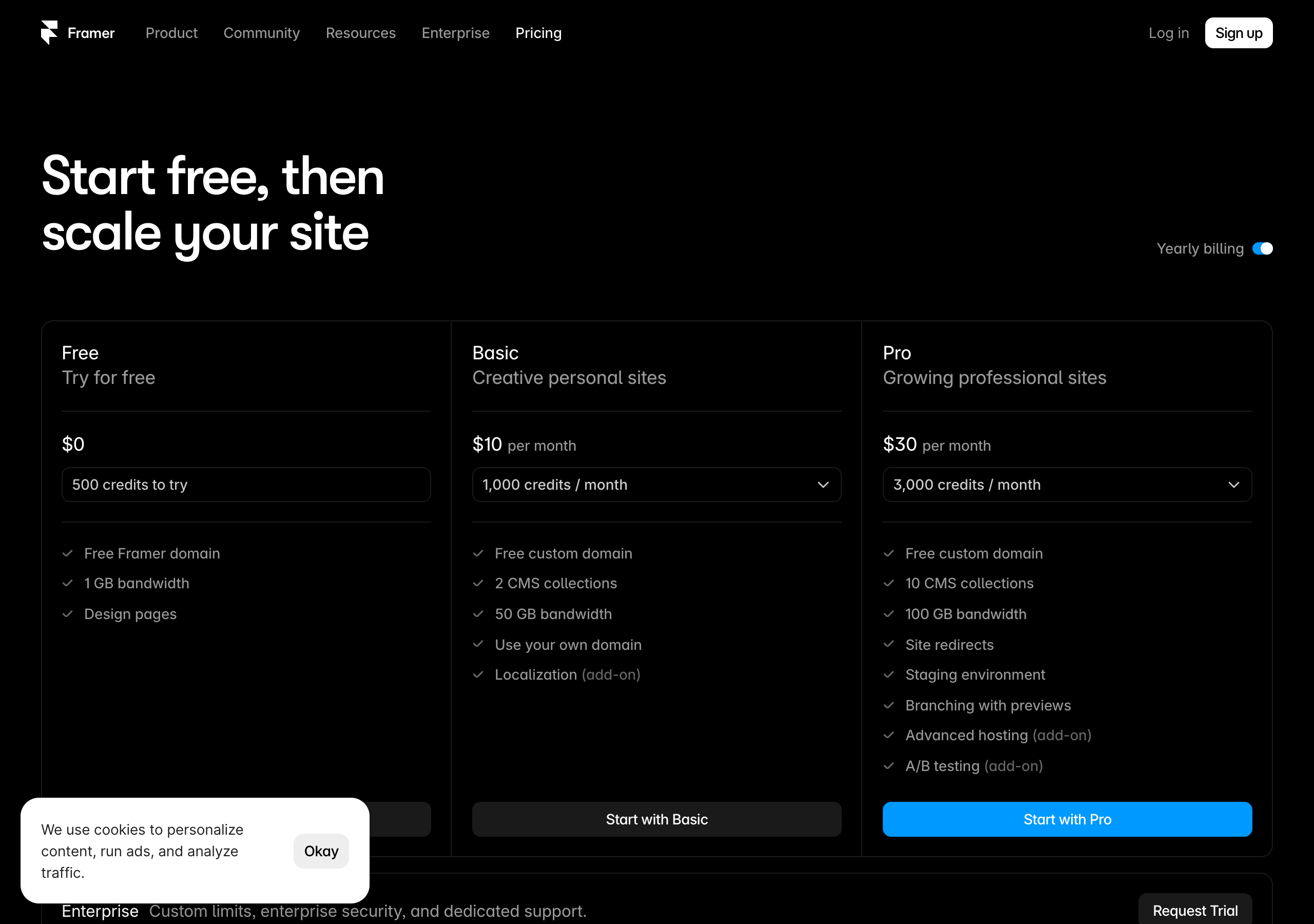
Framer prices per site, and the tiers are simple. Straight from Framer’s live pricing page (yearly billing), captured July 2026:
| Plan | Price | What you actually get |
|---|---|---|
| Free | $0 | 500 credits to try, free framer.website domain, 1 GB bandwidth, design pages |
| Basic | $10/mo | Free custom domain, 2 CMS collections, 50 GB bandwidth, use your own domain |
| Pro | $30/mo | 10 CMS collections, 100 GB bandwidth, site redirects, staging environment, branching with previews, A/B testing (add-on) |
| Enterprise | Custom | Custom limits, enterprise security, dedicated support |
That is basically the whole bill. Hosting, CDN, SSL, and maintenance are all included, because Framer is the host. One site, one predictable number.
WordPress is where the “free” reputation gets misleading. The WordPress software itself is free and open source, but a real self-hosted WordPress site is a stack of separate costs: hosting (from budget shared hosting up to managed WordPress plans that cost meaningfully more), a domain, often a premium theme, and frequently one or more premium plugins with their own annual renewals. Individually each is modest. Added up, a serious WordPress site’s annual cost is easy to underestimate, and that is before you count the biggest hidden line item of all: your time spent on updates, backups, and fixing conflicts, or the money you pay someone else to do it.
So the comparison depends on the site. For a single custom-domain marketing site or portfolio, Framer’s all-in-one price is usually both simpler to reason about and lower in total once you count hosting and maintenance. For a large, plugin-heavy site where you were going to be paying for premium extensions and hosting anyway, WordPress’s costs are the price of capabilities Framer does not offer, and they can be justified. Always price your exact setup, not the headline, because the only number that matters is the one for the site you are actually building.
Verdict: Framer wins on cost clarity and, for a typical single site, usually on true total cost once hosting and maintenance are counted. WordPress’s costs are real and add up, but for large plugin-dependent sites they buy capabilities that justify them.
The side-by-side scorecard
| Criteria | Framer | WordPress |
|---|---|---|
| Setup and hosting | Winner (nothing to stand up) | You are your own sysadmin |
| Maintenance and security | Winner (zero maintenance) | Ongoing updates, backups, patching |
| Design and speed to launch | Winner (beautiful by default) | Depends on theme, more work |
| Flexibility and plugins | Covers common cases | Winner (near-infinite extensibility) |
| CMS and content scale | Strong for blogs, plan collections | Winner (scales to content empires) |
| Learning curve | Winner (gentle) | Steeper, many moving parts |
| SEO and performance | Fast by default (tie on ceiling) | Fast with work (tie on ceiling) |
| Total cost | Winner (all-in-one, predictable) | Stacked costs, can add up |
Tally: Framer takes setup, maintenance, design speed, learning curve, and total cost. WordPress takes flexibility and content scale. SEO is a tie. That pattern is not an accident; it is the hosted-convenience-versus-open-extensibility split showing up in every row.
Who actually wins, by use case
Averages are useless when you have one specific site to build. So here is the direct call for the projects people most often ask about.
- Personal portfolio or creative site: Framer. Speed, beautiful defaults, effortless motion, and zero maintenance are exactly what a portfolio needs, and you will never miss WordPress’s plugins.
- Startup or SaaS marketing site and landing pages: Framer. Fast iteration, premium feel, easy A/B testing on Pro, predictable per-site pricing, and nothing to patch fit how startups actually work.
- Small-business website: Framer. A restaurant, studio, or local service gets a fast, professional site live in a day, and the owner can edit it later without becoming a part-time webmaster.
- Large blog, news site, or content empire: WordPress. Once you are managing thousands of posts, multiple authors, and complex editorial workflows, WordPress’s CMS is worth its overhead.
- Membership site, forum, LMS, or complex store: WordPress. These live or die on specific plugins, and that is precisely what WordPress’s ecosystem exists for.
- You need full ownership of your code, database, and hosting: WordPress. If self-hosting and total control are non-negotiable for you, that is WordPress by definition, and Framer is not trying to be that.
- Anything where you value “it just works and stays working” over infinite flexibility: Framer.
For the majority of people reading a “Framer vs WordPress” comparison, the honest truth is that you are in one of the Framer rows, and you probably suspected it before you got here. The people who genuinely need WordPress usually know it, because they can name the exact plugin or the exact scale that requires it.
Can you switch later if you pick wrong?
Yes, and knowing that should lower the stakes. Neither platform locks your content away permanently. Moving a small-to-medium marketing site from one to the other is a rebuild, not a rewrite, and because Framer is visual and no-code, recreating a WordPress marketing site in it is often a matter of days. There is no automatic one-click migration between them, and moving a genuinely huge WordPress content library into any other system is real work, so plan the direction of a possible move before you scale. The practical advice: pick the platform that fits the site you are building now, ship it, and only reconsider if you truly outgrow it.
Common mistakes people make choosing between them
- Choosing WordPress for its ceiling when your project lives entirely in the space Framer handles. You take on hosting, updates, and security work to unlock flexibility you will never use.
- Choosing Framer for a genuinely plugin-dependent project. If your site needs a membership system, a forum, or one specific plugin, count that requirement before you fall for the fast, pretty demo.
- Believing WordPress is free. The software is free; the real site is not, once you add hosting, a theme, premium plugins, and your own maintenance time.
- Underestimating maintenance. The unpatched WordPress site is the hacked WordPress site. If nobody is going to own updates and backups, a hosted platform like Framer is the safer choice.
- Comparing on SEO. Between these two, a well-built site ranks the same. This is a distraction from the differences that actually matter.
- Not touching either tool. An hour in Framer’s free version settles more than a week of articles.
Frequently asked questions
Is Framer easier than WordPress? Yes, clearly, for most people. Framer’s Figma-like canvas, beautiful defaults, and total lack of hosting, plugins, and updates make it far faster to learn and to ship a first real site with, especially for non-developers.
Is WordPress more powerful than Framer? For extensibility, yes. WordPress’s open-source plugin ecosystem can build memberships, forums, learning platforms, complex stores, and bespoke custom functionality that a bounded hosted builder cannot match. For designing a beautiful marketing site quickly, Framer usually produces a better result faster.
Is WordPress really free? The WordPress software is free and open source, but a live self-hosted site is not: you pay for hosting, a domain, often a premium theme and plugins, plus the ongoing time cost of maintenance. Framer bundles hosting and maintenance into one plan.
Do I need to worry about security and updates with Framer? No. Framer is fully hosted and maintains the platform, so there are no plugins or core software for you to patch. With self-hosted WordPress, keeping everything updated and backed up is your responsibility, and neglecting it is the most common cause of hacked sites.
Can Framer do SEO as well as WordPress? Yes. Both give you meta titles, descriptions, Open Graph images, alt text, and fast, semantic, responsive output. WordPress reaches top performance with the right plugins and host; Framer is fast by default. Rankings depend far more on your content and search intent than on which of these two you choose.
Which is better for a blog? For a normal marketing blog, Framer is more than enough and far less hassle. For a large, high-volume, multi-author publication or content empire, WordPress’s CMS is the stronger fit.
Which is better for e-commerce? For a simple product or a few items, Framer can present them cleanly, though it is not a full store backend. For a serious catalog with variants, inventory, and checkout complexity, WordPress with WooCommerce (or a dedicated commerce platform) is the more capable route.
Can I use my own domain on Framer? Yes. Framer includes a free custom domain from the Basic plan; the free plan uses a framer.website subdomain.
The bottom line
Strip away the feature lists and it comes down to one sentence. If your goal is to ship a beautiful, fast website this week and then never think about hosting, plugins, or security again, Framer is the shorter, safer path, and for most people reading this, the right one. WordPress remains the serious pick when you need a specific plugin, a content operation at real scale, or full ownership of your own stack, and you accept the maintenance that comes with that power.
The best part is that you do not have to trust me. You can settle this for your exact project, for free, in under an hour.
Create your free Framer site now, drop in a template, edit it, and publish it to a live URL. If it feels this fast and this good on the first try, and there is genuinely nothing to maintain, you already have your answer, and you did not spend a weekend setting up hosting to get it.
Framer pricing, plan names, and CMS collection limits cited from Framer’s live pricing page, captured July 2026. Tiers and numbers change over time, and WordPress hosting, theme, and plugin costs vary widely by provider, so confirm current details on framer.com/pricing and with your chosen WordPress host before you commit.


