

Search “best website builder” and you get fifty listicles that all say the same thing: every tool is “the best,” every tool is “perfect for everyone,” and none of them will tell you which one to actually pick. That is not a comparison. That is an affiliate roundup written by someone who never opened the tools.
I have built real sites in most of these platforms. Not template demos that live for a weekend, but sites that had to load fast on a phone, get found on Google, and stay editable by someone who is not me six months later. That is the lens for this whole list. I am not scoring these builders on their marketing pages. I am scoring them on what it feels like to ship something real and then live with it.
Here is the honest headline, so you do not have to wait for it. There is no single “best website builder,” because a portfolio, an online store, a 500-page blog, and a startup landing page are completely different jobs. So this list does two things. First, it ranks ten builders that genuinely earn their place in 2026. Second, it tells you exactly which one to pick for your specific type of site, because that is the answer you actually came for.
The quick answer
If you want the short version before the deep dives:
- Best design-first builder, and the one most people underrate: Framer. If you want a beautiful, fast, custom-domain site live in hours instead of weeks, without learning to think like a front-end developer, this is the shortest path. It is my top pick for portfolios, landing pages, startup and marketing sites.
- Best for large, structurally complex sites: Webflow. Maximum control, steeper learning curve.
- Best for maximum flexibility and ownership: WordPress. Endless plugins, but you manage hosting and maintenance.
- Best all-in-one for absolute beginners: Wix. Easy, template-driven, less design finesse.
- Best for polished simple business and portfolio sites: Squarespace. Gorgeous templates, less creative freedom.
- Best dedicated store: Shopify. A real e-commerce backend, not a marketing-site builder.
- Best cheap one-pager: Carrd. Tiny sites, tiny price, limited scope.
The rest of this guide is the reasoning behind those calls, a mini-review of each of the ten, a side-by-side table, and a pick-by-need section so you can jump straight to your situation.
Not sure which one fits? The fastest way to end the debate is to touch the tool. Start a free Framer site and try to publish one real page in the next hour. No credit card needed, and an hour of building beats a week of reading roundups like this one.
How I ranked them: the 7 criteria
A ranking is only worth reading if you know what is being measured. Here are the seven things I weighed for every builder, and one line on why each one decides real projects:
- Speed to a live site. How fast a non-developer goes from blank screen to a real published page. This is where most people either fall in love or quietly give up.
- Design quality and freedom. How good the result looks by default, and how much creative control you get before you hit a wall you cannot climb without code.
- Ease of use and learning curve. How long before you are productive, not just poking around the interface.
- Content and CMS scaling. How well the tool handles blogs, collections, and dynamic pages as your content grows from ten items to ten thousand.
- E-commerce ability. Whether you can sell products properly, or whether the tool is really a marketing site that fakes a store.
- SEO and performance. Whether it outputs fast, well-structured pages that can rank, because a gorgeous site nobody finds is a hobby, not an asset.
- Pricing and true cost. Not the “starting at” number, but what you actually pay once your site is real, with a custom domain and the features you need.
No single builder wins all seven. That is the whole point. The best tool for you is the one that wins the criteria that matter for the site you are building right now.
The 10 best website builders in 2026
1. Framer, the best design-first builder
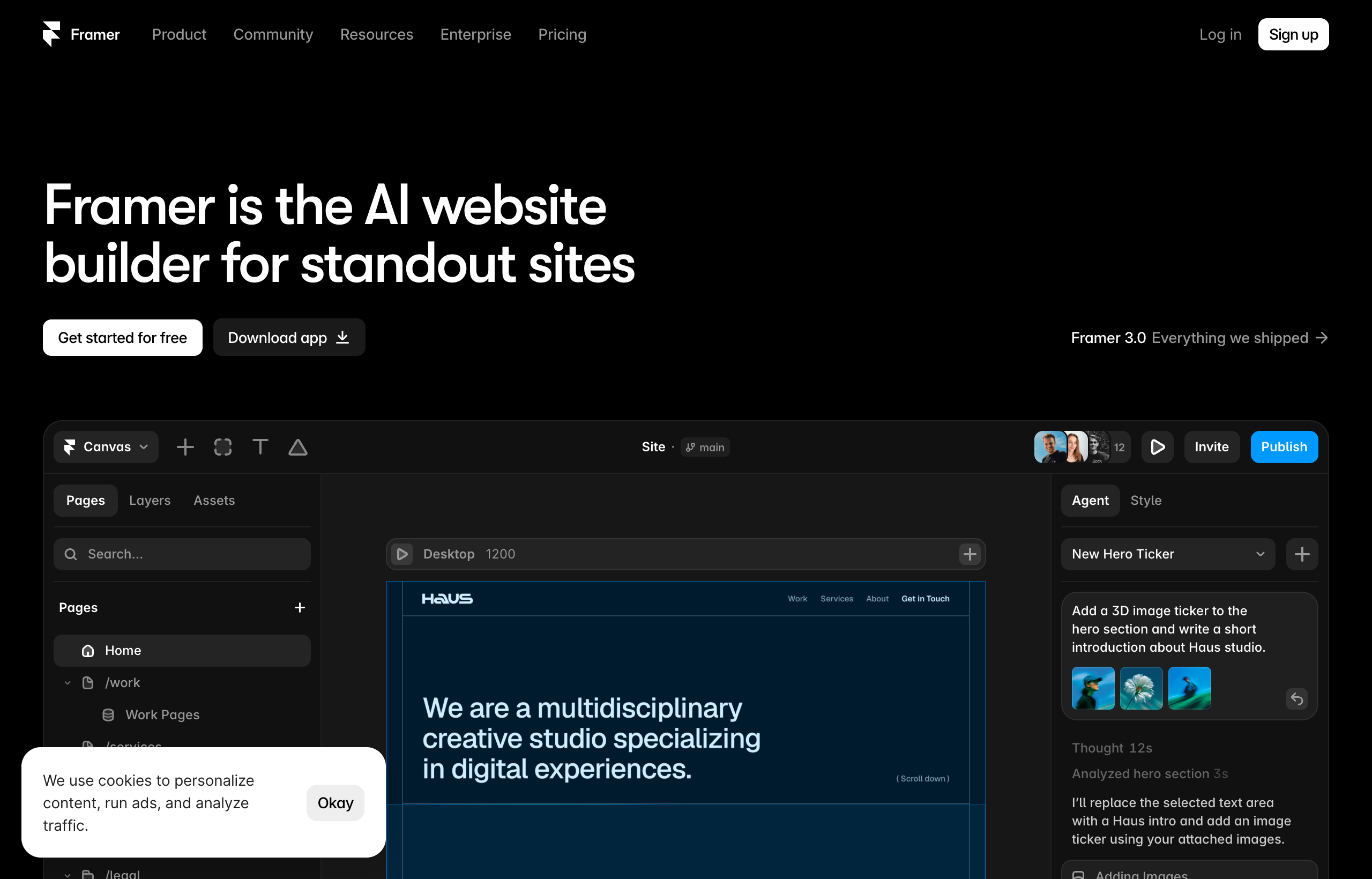
What it is: Framer is a no-code, design-first website builder. It grew out of a design and prototyping tool, and it shows the moment you open the canvas: it feels like Figma. You drag elements, type directly onto the page, drop in a pre-built section, and it looks polished by default because the defaults were built by people who care about typography and spacing. It is fully hosted on a global CDN, publishes instantly, and has a CMS, a template marketplace, and AI features baked in.
Best for: Portfolios, landing pages, startup and SaaS marketing sites, small-business sites, and anyone who wants a premium-looking site fast without a training course.
Strengths: This is the tool people are most surprised by. Speed to a live site is its home turf, and it is not close. A confident beginner can genuinely publish a clean one-page site in a single afternoon. Animations and scroll effects that make a site feel expensive are mostly a matter of selecting an element and choosing an effect, so a Framer site can look modern and high-end with very little effort. The learning curve is the gentlest of any serious builder here: if you have used Figma, Canva, or Sketch, you will feel oriented within an hour. It gives you real SEO controls (meta title, description, Open Graph image, alt text, responsive breakpoints) and optimizes image delivery well by default, which quietly saves beginners from the most common speed mistake.
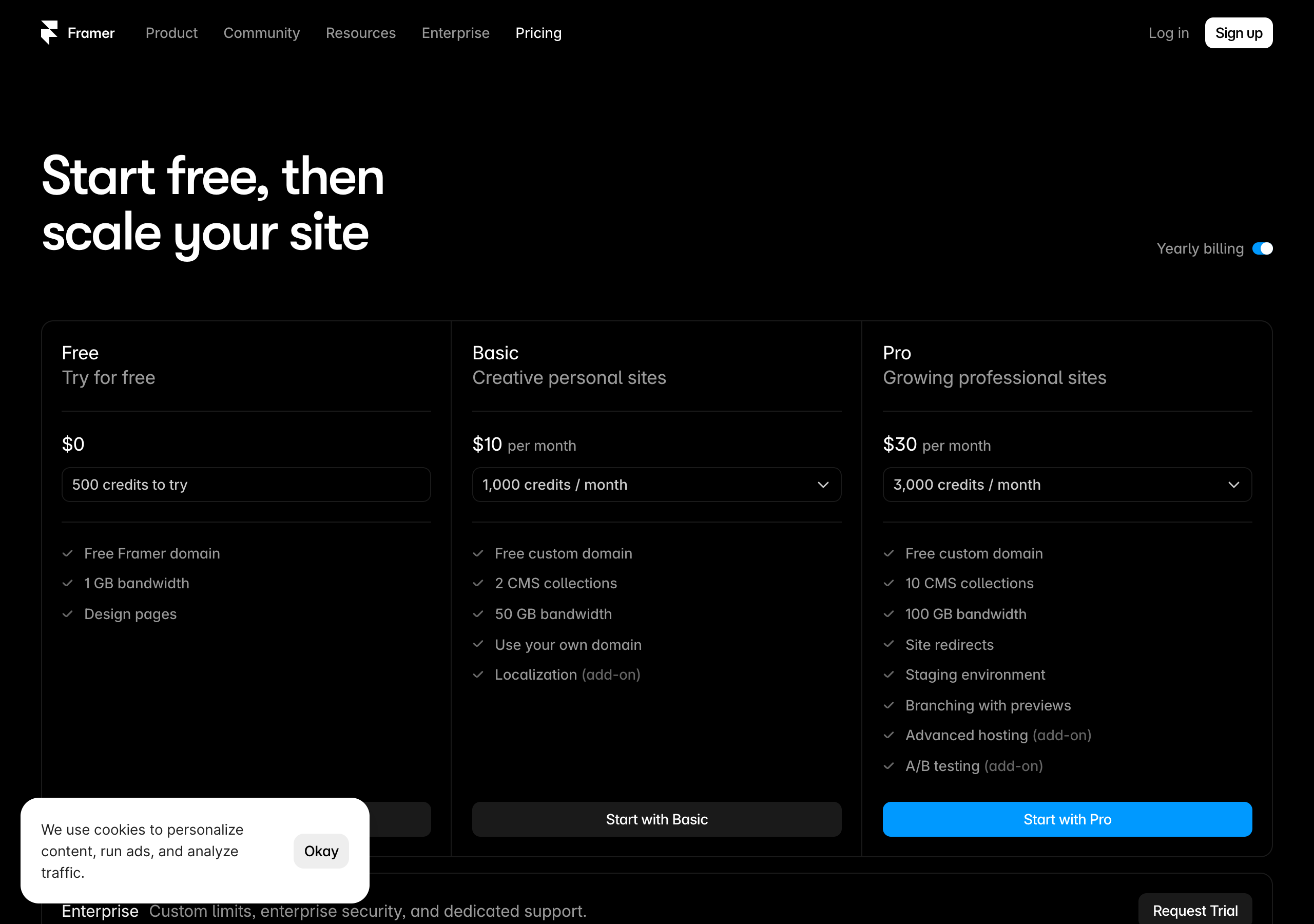
Trade-offs: Framer is not the tool for a massive, deeply relational content operation with thousands of interlinked items, and it is not a full e-commerce backend. Its CMS is capable and has improved fast, but plan your collections ahead: the Basic plan includes 2 CMS collections and the Pro plan includes 10, straight from Framer’s live pricing page. If you are architecting a huge directory or a store with variants and inventory, pair it with a dedicated tool or pick a different lead.
Pricing (yearly billing, from framer.com/pricing, captured July 2026): Free at $0 (500 credits to try, a free framer.website domain, 1 GB bandwidth, design pages, and a Framer badge). Basic at $10/mo (free custom domain, 2 CMS collections, 50 GB bandwidth). Pro at $30/mo (10 CMS collections, 100 GB bandwidth, site redirects, staging environment, branching with previews, and A/B testing as an add-on). Enterprise is custom. It prices per site, which makes the math simple: one site, one predictable bill.
My verdict: For the majority of people who type “best website builder” into Google, this is the answer they did not know they were looking for. If your project is a marketing site, portfolio, or landing page, Framer gives you the best design quality per hour of effort on this list.
2. Webflow, the best for structural control
What it is: Webflow is a no-code builder that exposes the underlying CSS box model and a full class system through a visual interface. When you open the Designer, you are looking at divs, flexbox and grid, classes, and a style panel that mirrors how a developer thinks about layout.
Best for: Large, structurally complex, content-heavy sites where you (or a developer on your team) want granular control over every element and a CMS that can model relationships between hundreds or thousands of items.
Strengths: The ceiling is high. Because it exposes the box model and a real class system, you can build almost anything a hand-coder could build in HTML and CSS: utility-class systems, reusable components with overrides, complex responsive behavior that follows exact rules. Its CMS is genuinely strong for relational content, reference and multi-reference fields, the kind of thing you need when posts link to authors and categories, or listings link to locations and tags. Its Interactions panel lets you chain detailed animation timelines with precise control.
Trade-offs: It front-loads the learning before it rewards you. Your first real site takes noticeably longer because you are also learning a structural system, and many beginners build their first Webflow page three times before it clicks. Pricing is where people get surprised: it splits into Site plans (hosting an individual website) and Workspace plans (governing projects and seats), so a real published site often costs both, and the total can exceed the “starts at” headline. I will not quote specific competitor numbers here, so check webflow.com/pricing for your exact setup.
My verdict: The serious pick when your project genuinely needs its ceiling. If your site lives entirely in the 90% that Framer handles, you will pay for Webflow’s power in weeks of learning you did not need.
3. WordPress, the most flexible and the most work
What it is: WordPress is the open-source platform that powers a large share of the web. It is endlessly extensible through themes and a massive plugin ecosystem, usually paired with a visual page-builder like a block editor or a third-party builder.
Best for: People who want maximum flexibility and full ownership, especially content-heavy sites, membership sites, and anyone who needs a specific plugin that only exists in the WordPress world.
Strengths: Flexibility is unmatched. Whatever you want to do, there is almost certainly a plugin for it, and you own your site fully: you can move hosts, export content, and never depend on a single company’s roadmap. For blogs and publications at scale, the content tooling is mature and battle-tested.
Trade-offs: You are the sysadmin now. WordPress needs hosting, updates, security patching, backups, and plugin-conflict debugging, which is real ongoing work that hosted builders simply do not put on your plate. For a non-developer, the setup and maintenance burden is the steepest here, and a neglected WordPress site is a security liability. The design result depends heavily on your theme and page-builder skill, so a great-looking site is achievable but not automatic.
My verdict: Choose WordPress when flexibility and ownership outrank convenience, or when a required plugin makes the decision for you. If you just want a beautiful marketing site live this week, a hosted builder gets you there with far less friction.
4. Wix, the friendliest all-in-one
What it is: Wix is a beginner-friendly, all-in-one hosted builder with a huge template library and a drag-anywhere editor.
Best for: Absolute beginners and small businesses that want everything (site, hosting, basic store, booking, email) under one roof with the least possible technical friction.
Strengths: It is genuinely easy to start, the onboarding holds your hand, and the all-in-one bundle means you rarely have to think about hosting or integrations. The template library is enormous, and the app market covers common small-business needs like bookings and simple stores.
Trade-offs: You trade design finesse for ease. Wix sites can look more template-locked and less bespoke than what Framer or a skilled Webflow user produces, and switching templates after you build is famously awkward. Power users often feel a ceiling on fine design control. It is a comfortable floor, not a high ceiling.
My verdict: A solid pick for a non-technical small-business owner who values “it just works” over design distinctiveness. If the look of the site is a competitive advantage for you, aim higher.
5. Squarespace, the most polished templates
What it is: Squarespace is a hosted, design-led builder known for clean, professional templates and a tidy editing experience.
Best for: Simple business sites, portfolios, restaurants, and creatives who want a polished result without much fuss.
Strengths: The templates are genuinely tasteful, and it is hard to make an ugly Squarespace site, which is a real advantage for people who do not trust their own design eye. The all-in-one hosting, blogging, and basic commerce make it a dependable choice for a straightforward professional presence.
Trade-offs: Creative freedom and animation are more limited than Framer. You are working within the template’s guardrails, which is exactly what makes it safe and also what makes it feel constrained once you want something distinctive. Deep customization and rich motion are not its strengths.
My verdict: Great for a clean, professional, low-effort site. If you want the same professionalism plus real design freedom and modern motion, Framer covers that ground with more headroom.
6. Shopify, the real store
What it is: Shopify is a dedicated e-commerce platform: a full store backend for products, inventory, checkout, payments, shipping, and taxes.
Best for: Anyone whose primary business is selling physical or digital products at any real volume.
Strengths: It is built for commerce end to end. Inventory, variants, discount codes, abandoned-cart recovery, payment processing, and a huge ecosystem of apps and integrations are all first-class, not bolted on. When selling is the point, a purpose-built store backend beats a marketing builder that added a cart.
Trade-offs: It is not a general-purpose design or content builder. For the marketing pages around your store, some people find it less flexible than a design-first tool, which is exactly why a common 2026 pattern is a beautiful Framer marketing site linking into a Shopify store for checkout. Position it honestly: Shopify is the store, not the whole brand site.
My verdict: If you are running a real store, use a real store. Pair it with a design-first builder for the marketing side if you want the best of both.

7. Carrd, the cheapest one-pager
What it is: Carrd is an ultra-simple builder for single-page sites: link-in-bio pages, simple landing pages, personal cards, and quick launches.
Best for: One-page sites where speed and price matter more than scope.
Strengths: It is fast, cheap, and dead simple. For a link-in-bio, a coming-soon page, or a single personal profile, you can be live in minutes, and the price is about as low as web hosting gets.
Trade-offs: It does one thing. Multi-page structure, a real CMS, and rich design systems are outside its scope by design. The moment your project grows past one page with a few sections, you outgrow it.
My verdict: Perfect for its narrow job, and a smart choice when that job is genuinely one simple page. Framer scales far beyond it the moment you need more, and Framer’s own free plan can cover a similar simple use case if you would rather start on a tool you will not outgrow.
8. Readymag, the design-forward outlier
What it is: Readymag is a design-forward builder popular for editorial projects, digital publications, and expressive portfolios.
Best for: Designers and editorial creators who want free-form, magazine-style layouts.
Strengths: It leans hard into creative, unconventional layout and typography, which makes it a favorite for portfolios and editorial pieces that want to feel like art direction rather than a template.
Trade-offs: It is more niche than the mainstream builders, and it competes with Framer precisely on design expression, where Framer adds stronger animation, a more modern hosting and publishing model, and a CMS. If you want the design-forward feel plus everyday practicality, the comparison usually favors Framer.
My verdict: A characterful pick for editorial and portfolio work. Try it head to head with Framer if design expression is your top priority, and let the live result decide.
9. Notion Sites, the simplest content route
What it is: Notion Sites turns Notion documents into simple published websites, so your docs become web pages.
Best for: People already living in Notion who want a fast, low-effort site for docs, wikis, simple personal pages, or a lightweight landing page.
Strengths: If your content already lives in Notion, publishing it as a site is about as frictionless as it gets. For internal-feeling docs, simple resource hubs, and quick personal pages, it is genuinely convenient.
Trade-offs: Design control is limited compared to a real builder. You get Notion’s look, lightly customized, which is fine for content but not for a distinctive brand site. It is a content-publishing shortcut, not a design tool.
My verdict: Great when the content is the product and you already use Notion. When the design and feel of the site matter, it is not in the same category as Framer.
10. Bubble, for when you need an app, not a site
What it is: Bubble is a no-code platform for building web applications with logic, databases, and user accounts, not just marketing pages.
Best for: Founders building an actual interactive product (a marketplace, a SaaS tool, a member portal) without hiring developers.
Strengths: It goes where website builders stop. If you need user logins, a real database, workflows, and dynamic app behavior, Bubble can build a functional product that a page builder simply cannot.
Trade-offs: It is a different tool for a different job, with its own significant learning curve, and it is overkill for a normal marketing site or portfolio. The design polish of a marketing site is not its strength, so many teams build the app in Bubble and the marketing site in Framer.
My verdict: On this list because “best website builder” sometimes really means “I need an app.” If that is you, Bubble belongs in the conversation. If you need a site, it does not.
If you have been comparing spec sheets for a week, that is the trap: the people who ship just start building and let the live site teach them. Spin up a free Framer project and publish one real page today. You will learn more in an hour of building than in a day of reading comparisons like this one.
Side-by-side comparison table
Here is the shortlist at a glance. The pricing column is deliberately general for the competitors, because inventing specific competitor numbers would be dishonest and prices change often. Only Framer’s numbers are quoted, straight from its live pricing page.
| Builder | Best for | Ease of use | Design freedom | Notes on cost |
|---|---|---|---|---|
| Framer | Portfolios, landing pages, marketing and startup sites | Very easy | Excellent, design-first | Free plan; Basic $10/mo, Pro $30/mo (yearly), per site |
| Webflow | Large, complex, relational content sites | Steep, expect to study | Maximum structural control | Split site + workspace plans, can add up (check current) |
| WordPress | Maximum flexibility and ownership | Hard for non-devs | Depends on theme and skill | Software is free, you pay hosting + maintenance |
| Wix | Beginners, small business all-in-one | Very easy | Moderate, template-driven | Tiered all-in-one plans (check current) |
| Squarespace | Polished simple business and portfolio | Easy | Moderate, template guardrails | Tiered all-in-one plans (check current) |
| Shopify | Selling products at real volume | Moderate | Store-focused, not design-first | Commerce plans plus transaction considerations (check current) |
| Carrd | One-page sites, link-in-bio | Very easy | Limited by design | Very low cost for tiny sites (check current) |
| Readymag | Editorial and design-forward portfolios | Moderate | High, expressive | Design-tool pricing tiers (check current) |
| Notion Sites | Docs, wikis, simple content pages | Very easy | Low | Tied to Notion plans (check current) |
| Bubble | Web apps, not marketing sites | Steep | App-focused, not design-first | App-platform pricing tiers (check current) |
Always open the live pricing page for any tool before you commit. Tiers and numbers change, and the only price that matters is the one for your exact setup.
How to choose: pick by what you are actually building
Averages are useless when you have one specific site to build. So here is the direct call by type of site.
- Personal portfolio or creative site: Framer. Speed, beautiful defaults, and effortless motion are exactly what a portfolio needs, and you will never hit the CMS ceiling.
- Startup or SaaS marketing site and landing pages: Framer. Fast iteration, a premium feel, easy A/B testing on Pro, and simple per-site pricing fit how startups actually work.
- Small-business website (studio, local service, restaurant): Framer or Squarespace. Framer if the look is a differentiator and you want modern motion; Squarespace if you want the safest, most template-guided route.
- Large blog or editorial publication: Webflow or WordPress. Once you manage hundreds of interrelated posts, authors, and categories, their content tooling earns its learning curve.
- Online store selling real products: Shopify, ideally with a Framer marketing site linking into it.
- A single link-in-bio or coming-soon page: Carrd, or Framer’s free plan if you would rather start on a tool you can grow into.
- A docs site or wiki you already keep in Notion: Notion Sites.
- An interactive web app with logins and a database: Bubble, not a website builder.
- Maximum flexibility, ownership, or a specific required plugin: WordPress.
For most people reading a “best website builder” roundup, the honest truth is that you are building a portfolio, a marketing site, or a landing page, and you suspected the design-first answer before you got here.
Common mistakes when choosing a website builder
- Choosing the most powerful tool for a simple site. Picking Webflow or WordPress for a project that lives entirely in the 90% a design-first builder handles means paying in weeks of learning for control you will never use.
- Choosing on the “starting at” price. Especially with split-plan tools, price your exact setup, custom domain and all, before you decide. The headline number is rarely the real number.
- Comparing builders on SEO alone. Between the serious hosted builders here, SEO is largely a wash. All of the good ones give you meta titles, descriptions, Open Graph images, alt text, and fast, semantic output. Rankings are won by content, links, and matching search intent, not by which logo is in the corner.
- Not touching the tool before deciding. An hour in the free version settles more than a week of articles. Every builder feels different in the hand than on its marketing page.
- Ignoring who edits the site later. If a non-technical teammate has to update content, a friendly builder like Framer or Squarespace saves you a support headache that a class-system tool will create.
- Forcing one tool to do every job. The pros often mix: a design-first marketing site plus a dedicated store or app. Using the right tool for each part beats bending one tool past its limits.
Frequently asked questions
What is the best website builder overall in 2026? There is no single winner for everyone, because the jobs are too different. For the most common need, a beautiful marketing site, portfolio, or landing page live fast, Framer is my top pick for design quality per hour of effort. For a large relational content site, Webflow. For a real store, Shopify. Match the tool to the job.
What is the easiest website builder for beginners? Wix and Squarespace are the friendliest all-in-one options, and Framer is remarkably approachable if you have ever used a modern design tool like Figma or Canva. For a single simple page, Carrd is the quickest of all.
Which website builder is best for design? Framer, for most people. It is design-first, ships beautiful motion almost for free, and produces a premium result quickly. Readymag is a strong design-forward alternative for editorial and expressive portfolios.
Which builder is best for an online store? Shopify, because it is a purpose-built store backend with inventory, checkout, and payments handled properly. A common pattern is a Framer marketing site linking into a Shopify store.
Can I build a website for free? Yes. Framer has a free plan (500 credits, a free framer.website subdomain, 1 GB bandwidth, and a Framer badge), which is enough to build and publish a real page. To use your own custom domain and remove the badge, you move to a paid plan, which on Framer starts at $10/mo on the Basic tier (yearly billing).
Is Framer better than WordPress? For a fast, beautiful, low-maintenance marketing site, yes, because Framer is hosted and needs no updates, security patching, or plugin management. WordPress wins when you need its plugin ecosystem, full ownership, or maximum flexibility and you are willing to maintain it.
Do I need to know how to code for any of these? No. All ten are no-code at their core. Webflow and WordPress simply ask you to think more like a developer even though you never write code, while Bubble expects you to think in app logic.
How much should a website builder cost? For a single custom-domain marketing site, expect a modest monthly plan. Framer’s per-site model (Basic $10/mo, Pro $30/mo on yearly billing) is simple to reason about. Split-plan tools can total more than their headline once you add a custom domain and the features you need, so always price your exact setup on the live pricing page.
The bottom line
Strip away the noise and it comes down to one sentence: the best website builder is the one that wins the criteria your specific site depends on. For the majority of people, that site is a portfolio, a landing page, or a marketing site, and the shortest path to a beautiful, fast, custom-domain version of it is Framer. Webflow remains the serious pick for large, complex content sites; WordPress for flexibility and ownership; Shopify for real stores; and the friendlier all-in-ones for the simplest professional presence.
The best part is that you do not have to trust a list. You can settle it for your exact project, for free, in under an hour.
Create your free Framer site now, drop in a template, edit it, and publish it to a live URL. If it feels this fast and this good on the first try, you already have your answer, and you did not spend a weekend in a training course to get it.
Framer pricing, plan names, and CMS limits cited from Framer’s live pricing page, captured July 2026. Competitor pricing is described in general terms on purpose and was not quoted with specific numbers; tiers and prices change over time, so confirm current details on each tool’s official pricing page before you buy.


